


IHR EINFACHER WEG ZU
EINEM FUGENLOSEN BADEZIMMER
Zusammen mit unserem Profiteam realisieren wir mit Ihnen von der Planung bis zur Ausführung Ihren Traum vom neuen Badezimmer. Durch unsere Raumelemente erhält Ihr Bad in nur 5 Tagen einen völlig neuen Look.
Digital & nah
WunderWorks begleitet Sie jederzeit – online, ganz flexibel und wann immer es für Sie passt
Aus einer Hand - im Handumdrehen
Von der individuellen Planung bis zur Realisierung – bei WunderWorks alles aus einer Hand
Fugenloses Bad
Wir setzen auf fugenlose Bäder ohne Fliesen. Tolle Optik, reinigungsfreundlich und wunderbar hygienisch
Kurze Baustellenzeit
Vorgefertigte Raumelemente und fugenlose Wandverkleidungen ermöglichen eine kürzere Bauzeit
Fugenlose Badezimmer von WunderWorks
Wir bei WunderWorks setzten dafür innovative Wandverkleidungen ein. Diese können spielend leicht montiert werden und haben damit entscheidende Vorteile gegenüber fast fugenlosverlegten Fliesen oder Mikrozement:
Und das ist noch nicht alles – diese Perfektion wird durch nahtlos integrierte Fußböden und Decken abgerundet. Willkommen in einer Welt, in der Design keine Grenzen kennt!
Unser starkes Markenportfolio







SO EINFACH GEHT’s:
Ihre Badsanierung
in 4 Schritten.


Vorbereitungs-Check
-
Dokumentation des aktuellen Bads durch Sie. Hier finden Sie unsere Aufmaß-Anleitung
-
Aufnahme Erneuerungswünsche in Wort und Bild
-
Telefonischer Erstkontakt

Digitale Badplanung
-
Präsentation der Badplanung durch unseren BadMaster
-
Gemeinsame Produktbemusterung live im 3D-Planer
-
Angebotserstellung & Auftragserteilung

Vor-Ort-Check
-
Umsetzungsvalidierung durch unseren BadTechniker bei Ihnen vor Ort
-
Finales Aufmaß für Auftragsfreigabe
-
Festlegung des Umsetzungszeitraumes

Umsetzung
-
Koordination der Umbauarbeiten durch unsere BadTechniker
-
Vorbereitung & Umsetzung durch unsere BadPartner
-
Abnahme & Übergabe an Sie


Lassen Sie sich inspirieren
Welcher Bad-Typ sind Sie?
Welche Form hat Ihr Bad?
Kostenbeispiele
von Badsanierungen:
Kleines Bad für 16.000 €
Siehe Details
Durchzuführende Arbeiten:
1. Demontage der Sanitäreinrichtung
2. Anpassen der Wasserleitungen
3. Installation des Vorwandmoduls mit integrierten Leitungen für Wand-WC und Duscharmatur
4. Abdichten des Fußbodens und Duschbereichs
5. Installation der Duschwanne
6. Vorbereitung der Wand- und Bodenfläche für neuen Belag
7. Montage der neuen Wand- und Bodenbeläge
8. Endmontage des WCs, der Duscharmatur, Duschabtrennung, Waschbecken und Badmöbel
Kleines Bad für 16.000 €
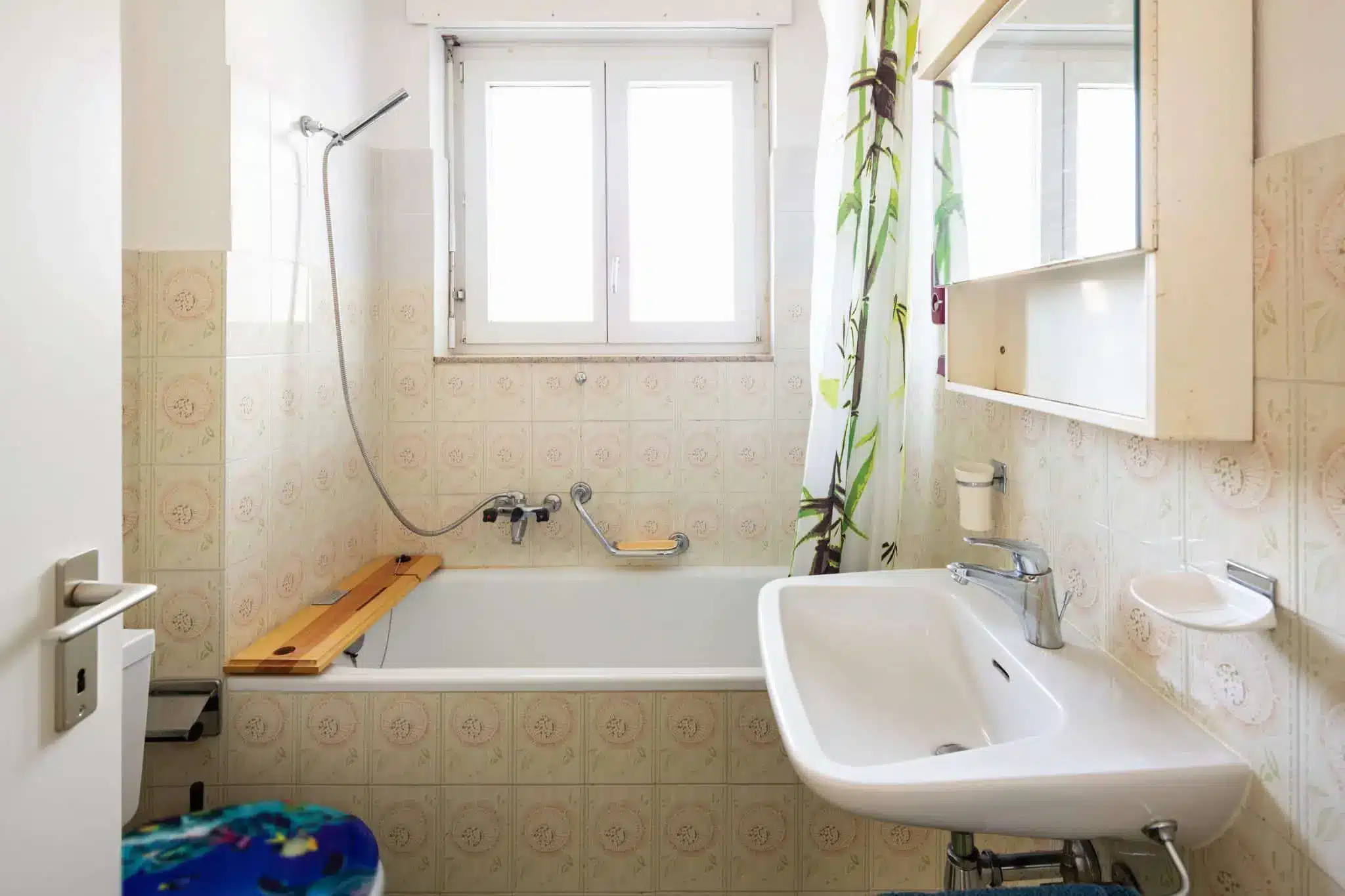
Zunächst wird die traditionelle Badewanne durch eine geräumige Walk-In Dusche ersetzt, dies ermöglicht nun einen bequemen Zugang zur Dusche ohne lästiges Klettern. Außerdem wird das altmodische Stand-WC gegen ein platzsparendes Wand-WC ausgetauscht. Dadurch gewinnt das Badezimmer nicht nur an Ästhetik, sondern auch an Raum. Die unhandliche Duschvorhangstange solls einem eleganten Duschabtrennungssystem weichen, das das Badezimmer aufgeräumter und ansprechender macht. Nun wird das Wasser ordentlich in der Dusche gehalten und sorgt für ein angenehmes Duscherlebnis. Um den Stauraum im Badezimmer zu verbessern, wurden praktische Badmöbel hinzugefügt. Diese bieten nun ausreichend Platz für Handtücher, Toilettenartikel und andere Badezimmerutensilien. Abgerundet wird die Renovierung durch die Verlegung eines neuen Boden- und Wandbelags.
Durchzuführende Arbeiten:
1. Demontage der Sanitäreinrichtung
2. Anpassen der Wasserleitungen
3. Installation des Vorwandmoduls mit integrierten Leitungen für Wand-WC und Duscharmatur
4. Abdichten des Fußbodens und Duschbereichs
5. Installation der Duschwanne
6. Vorbereitung der Wand- und Bodenfläche für neuen Belag
7. Montage der neuen Wand- und Bodenbeläge
8. Endmontage des WCs, der Duscharmatur, Duschabtrennung, Waschbecken und Badmöbel
Komplettbadsanierung für 20.000 €
Siehe Details
Durchzuführende Arbeiten:
1. Demontage der Sanitäreinrichtung
2. Anpassen der Wasserleitungen und Heizungsleitungen
3. Verlängerung der Heizungsleitung und einrichten des Anschlusses
4. Installation des Vorwandmoduls mit integrierten Leitungen für Wand-WC, Duscharmatur, Badewannenarmatur und Waschtisch
5. Abdichten des Fußbodens und Duschbereichs
6. Aufstellen der Duschwanne und Badewanne
7. Montage der neuen Wand- und Bodenbeläge
8. Endmontage des WCs, der Duscharmatur, Duschabtrennung, Badewannenarmatur, Doppelwaschbecken, Badmöbel und Heizkörper
Komplettbadsanierung für 20.000 €
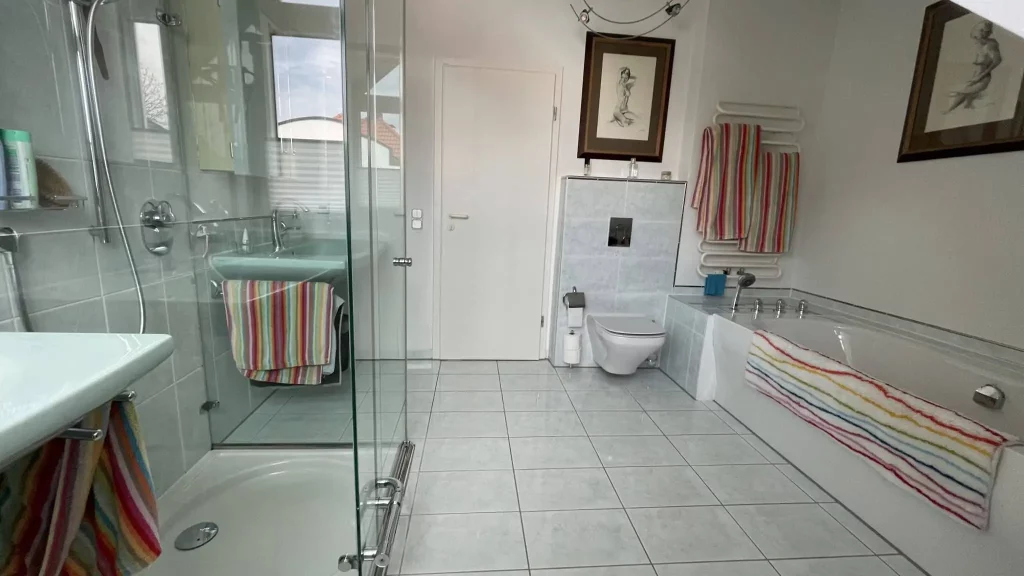
Die Dusche wird nicht nur vergrößert, sondern auch an eine neue Position verlegt. Dadurch konnte sie optimal in den Raum integriert werden und bietet nun mehr Bewegungsfreiheit und Komfort beim Duschen. Ein einfaches Waschbecken wird durch einen eleganten Doppel-Waschplatz ersetzt und mit den passenden Möbeln ergänzt. Das Wand-WC wird strategisch umpositioniert, weg vom Eingangsbereich, um eine bessere Privatsphäre und einen reibungslosen Zugang zum Badezimmer zu gewährleisten. Der Badheizkörper wird ebenfalls umpositioniert, um den Raum effizienter zu nutzen und eine gleichmäßige Wärmeverteilung zu ermöglichen. Dadurch wird nicht nur die Wärme im Badezimmer verbessert, sondern auch die Ästhetik des Raumes optimiert. Abgerundet wird die Renovierung durch einen neuen Boden- und Wandbelag. Die Wahl des Belags wurde dabei sowohl auf ästhetische Aspekte als auch auf die praktischen Anforderungen im Badezimmer abgestimmt.
Durchzuführende Arbeiten:
1. Demontage der Sanitäreinrichtung
2. Anpassen der Wasserleitungen und Heizungsleitungen
3. Verlängerung der Heizungsleitung und einrichten des Anschlusses
4. Installation des Vorwandmoduls mit integrierten Leitungen für Wand-WC, Duscharmatur, Badewannenarmatur und Waschtisch
5. Abdichten des Fußbodens und Duschbereichs
6. Aufstellen der Duschwanne und Badewanne
7. Montage der neuen Wand- und Bodenbeläge
8. Endmontage des WCs, der Duscharmatur, Duschabtrennung, Badewannenarmatur, Doppelwaschbecken, Badmöbel und Heizkörper
Teilsanierung für 8.000 €
Siehe Details
Durchzuführende Arbeiten:
1. Demontage der Sanitäreinrichtung
2. Anpassen der Wasserleitungen und Heizungsleitungen
3. Verlängerung der Heizungsleitung und einrichten des Anschlusses
4. Installation des Vorwandmoduls mit integrierten Leitungen für Wand-WC und Waschbecken
5. Montage der neuen Wand- und Bodenbeläge
6. Endmontage des WCs, Waschbeckens, der Badmöbel und Heizkörper
Teilsanierung für 8.000 €
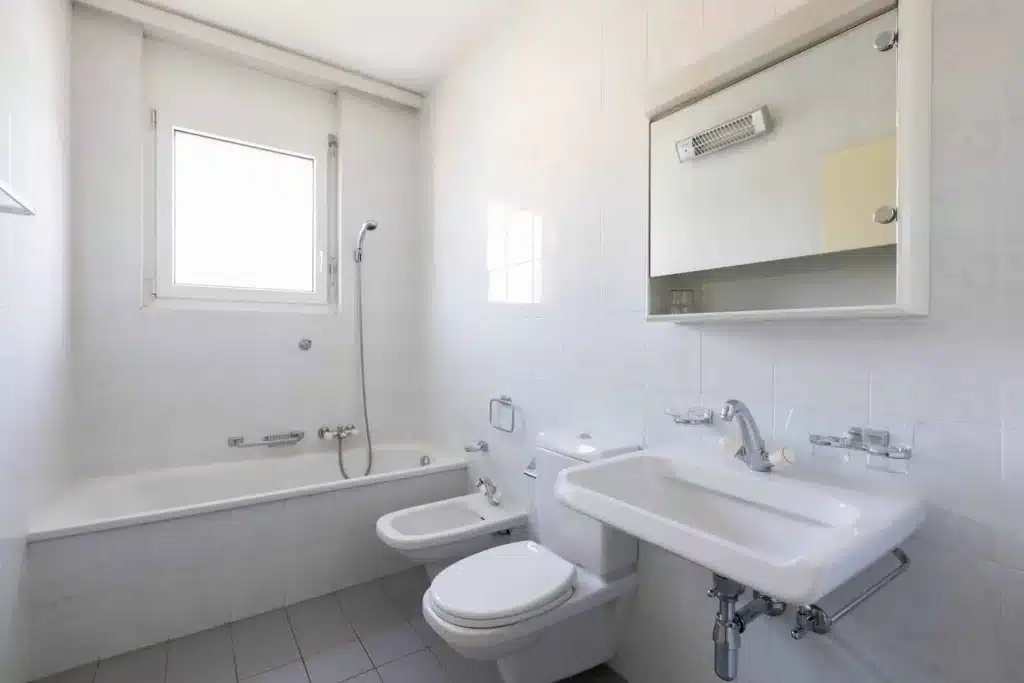
Zuallererst wird eine Duschabtrennung auf der Badewanne hinzugefügt. Dieser praktische Zusatz verhindert effektiv das Austreten von Wasser während des Duschens. Das Bidet wird aus Platz- oder Designgründen entfernt. Ein Badheizkörper wird als Ergänzung eingeführt, um zusätzliche Wärme und Komfort in den Raum zu bringen. Das Stand-WC wird gegen ein platzsparendes Wand-WC ausgetauscht. Dieser Wechsel verleiht dem Raum auch ein modernes und elegantes Erscheinungsbild. Ein einfaches Waschbecken wird gegen ein Möbel-Waschbecken inklusive Badmöbel ausgetauscht. Die neuen Möbel werden passend zum Waschbecken ausgewählt und tragen zur ästhetischen Aufwertung des Badezimmers bei. Schließlich wird sowohl der Boden- als auch der Wandbelag erneuert. Der neue Belag verleiht dem Badezimmer ein frisches Aussehen und passt zur gewünschten Atmosphäre des Raumes.
Durchzuführende Arbeiten:
1. Demontage der Sanitäreinrichtung
2. Anpassen der Wasserleitungen und Heizungsleitungen
3. Verlängerung der Heizungsleitung und einrichten des Anschlusses
4. Installation des Vorwandmoduls mit integrierten Leitungen für Wand-WC und Waschbecken
5. Montage der neuen Wand- und Bodenbeläge
6. Endmontage des WCs, Waschbeckens, der Badmöbel und Heizkörper
Wanne zu Dusche für 5.000 €
Siehe Details
Durchzuführende Arbeiten:
1. Demontage der Sanitäreinrichtung
2. Entfernen der Fliesen und des Estrichs
3. Anpassen der Wasserleitung für die Dusche und der Heizungsleitungen
4. Installation des Vorwandmoduls mit integrierten Leitungen für die Duscharmatur
5. Aufstellen der Duschwanne
6. Montage der Wand- und Bodenbeläge
7. Endmontage der Duschabtrennung und des Badheizkörpers
Wanne zu Dusche für 5.000 €
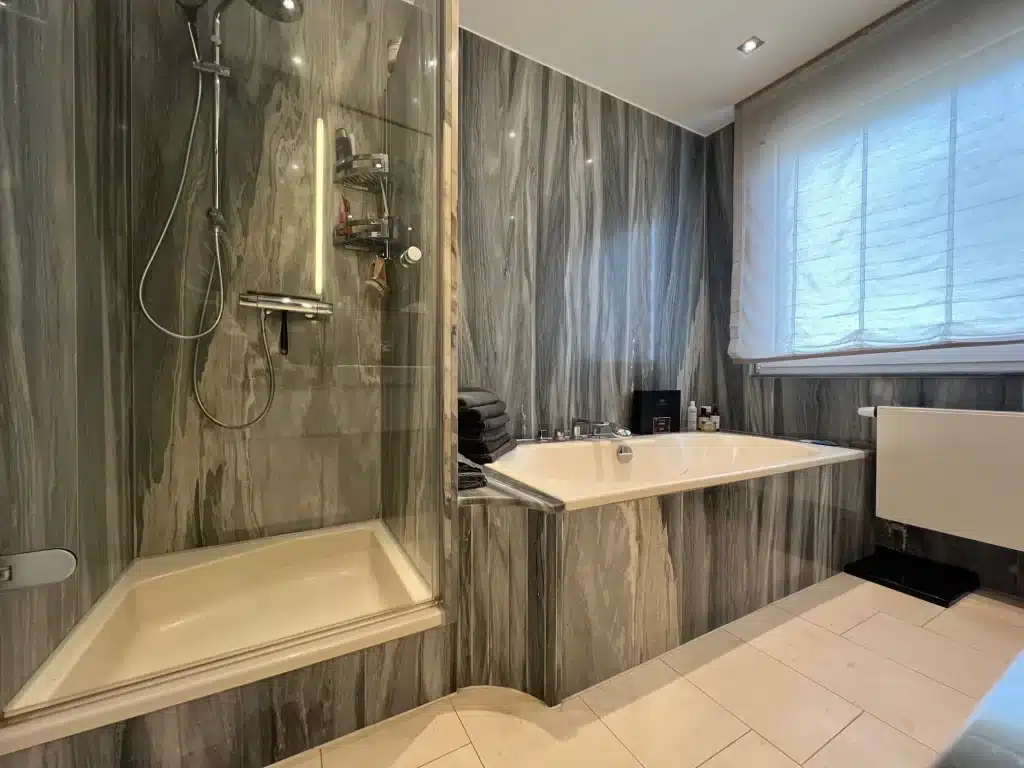
Zunächst wird die bisherige Badewanne und die kleine Dusche entfernt, um Platz für einen großzügigen Walk-In Duschbereich zu schaffen. Dieser neue Duschbereich bietet nun viel Bewegungsfreiheit und Komfort beim Duschen. Um das Badezimmer effektiv zu beheizen, wird ein Badheizkörper ergänzt. Dieser sorgt nicht nur für wohlige Wärme, sondern dient auch als Handtuchhalter, um Handtücher griffbereit und schnell trocknen zu können. Ein weiterer wichtiger Aspekt der Renovierung betrifft den Boden- und Wandbelag. Hier wird ein neuer Belag gewählt, der dem Badezimmer ein frisches und zeitgemäßes Erscheinungsbild verleiht. Durch diese Veränderungen wurde das Badezimmer zu einem modernen und funktionalen Raum umgestaltet.
Durchzuführende Arbeiten:
1. Demontage der Sanitäreinrichtung
2. Entfernen der Fliesen und des Estrichs
3. Anpassen der Wasserleitung für die Dusche und der Heizungsleitungen
4. Installation des Vorwandmoduls mit integrierten Leitungen für die Duscharmatur
5. Aufstellen der Duschwanne
6. Montage der Wand- und Bodenbeläge
7. Endmontage der Duschabtrennung und des Badheizkörpers
Ihre Vorteile
bei WunderWorks
Effizienz durch digitale Planungen
Die digitale Badplanung von WunderWorks bietet Ihnen die Möglichkeit, Ihr Bad detailliert im Vorfeld zu planen. Sie nennen uns lediglich die Größe und Form Ihres Bades, anschließend bestimmen Sie die Ausstattung ganz nach Ihren Wünschen. Darüber hinaus zeigen wir Ihnen gerne verschiedene Möglichkeiten auf. So finden Sie für sich das perfekte Bad.
Von Teilsanierung bis Komplettsanierung
Die Badsanierung mit WunderWorks kann auf unterschiedliche Weise durchgeführt werden. Vom Produkttausch bis hin zur kompletten Sanierung ist alles möglich. Je nach Umfang wirkt sich das natürlich auch auf die Kosten aus.
Kurze Baustellenzeit und fugenlose Badlösungen
In nur wenigen Tagen haben Sie ein neues Bad, das Ihren Ansprüchen entspricht. Dank unseren wunderbaren Gestaltungselementen können in den meisten Fällen die Fliesen an der Wand bleiben. So können wir Ihnen kurze Baustellenzeiten und wenig Schmutz garantieren.
WunderNews
Bleiben Sie auf dem Laufenden und lassen Sie sich von spannenden Badezimmerideen inspirieren.

WunderWorks –
die wunderbare
Badsanierung aus einer Hand
Badsanierung bei WunderWorks heißt: Sie brauchen sich um nichts zu kümmern! Unser BadMaster nimmt Ihnen die ganze Arbeit ab.
Wir bieten Ihnen maßgeschneiderte, langlebige Lösungen für Ihr Wunsch-Bad aus einer Hand. Und das mit einem hohen Anspruch an die Qualität der eingesetzten Produkte genauso wie bei der Ausführung der einzelnen Arbeitsschritte.
Ein eingespieltes Team aus erfahrenen Planern, Technikern und Fachhandwerkern garantiert dabei reibungslose Abläufe. Freuen Sie sich auf inspirierende Gestaltungsmöglichkeiten, die schnell, sauber und stressfrei für Sie umgesetzt werden können.

“ Von wegen Riesen-Aufwand.
Der Umbau meines Badezimmers
hat mit WunderWorks gerade mal drei Tage in Anspruch genommen.“

“ Nur ein Ansprechpartner
statt viele verschiedene
Fachhandwerker – dank
WunderWorks hab ich bei der Renovierung jede Menge
Zeit und Nerven gespart.“

“ Die Vorteile der fugenlosen
Badsanierung hat mich echt überzeugt. Keine Fliesen abklopfen, so hab ich echt viel Zeit gespart.“

“ Die von WunderWorks haben mich sehr gut beraten und wir haben selbst für mein kleines Gästebad eine super Lösung gefunden.“
